
[Announcement] "Freezing" Login Streaks
Skip days without losing your daily login streak – collect freeze points!
Friends, we have great news! We are adding ❄ freeze points to the game, which will help you keep your daily login progress even if you miss a day or two.
What is "freezing" your login streak?
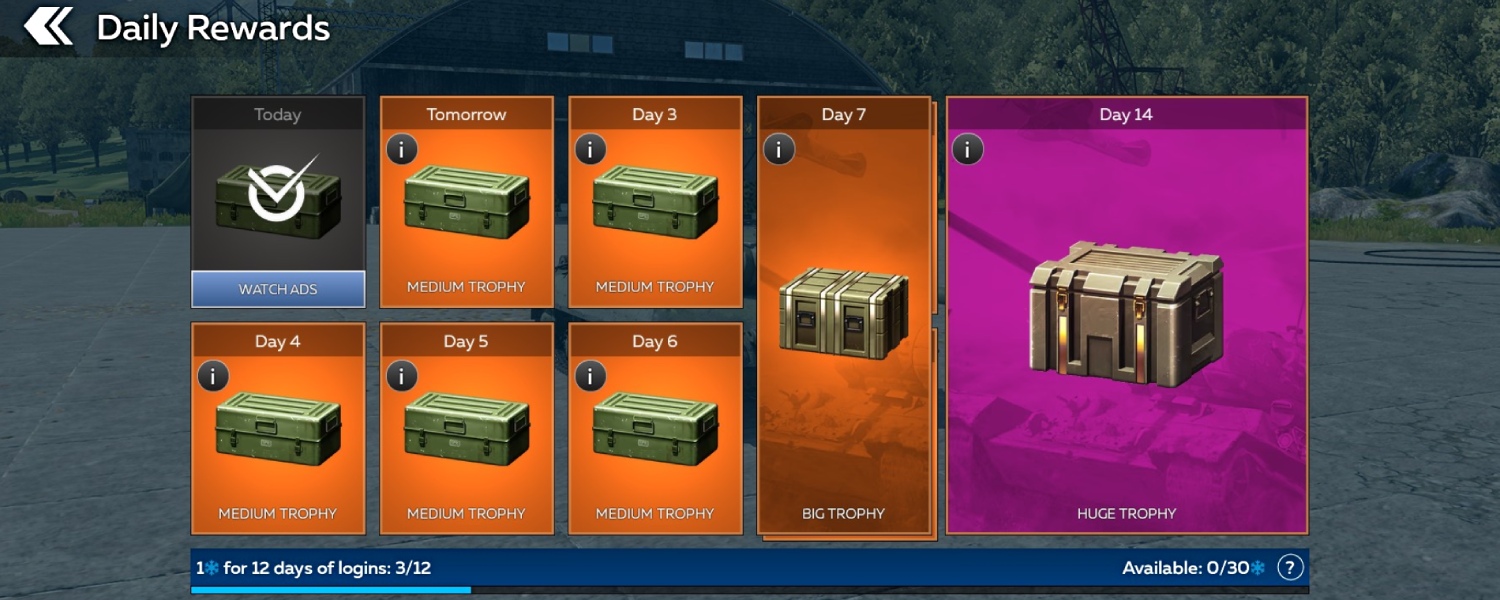
War Thunder Mobile and War Thunder share a daily login progress, with points shared across both games. Every day you log in, you receive a reward, and on the 7th and 14th days of the cycle you will find big trophies with valuable prizes.
Very soon, a new convenient feature will appear in the game: "freezing" missed logins! If you happen to miss a day, your login streak won't reset – instead, the day will be "frozen", automatically spending 1 ❄ freeze point. No manual activation or confirmation is needed – the system takes care of it for you.
How to earn points?
- 1 ❄ is awarded automatically for every 12 days of logging in. Logging into War Thunder or War Thunder Mobile counts toward progress.
- You can accumulate a maximum of 30 ❄.
- Points are shared across War Thunder and War Thunder Mobile: logging into either game counts the day (a second point is not awarded for the same day).
- The mechanic is free, not tied to a Premium account, and available to all players. Freezes cannot be bought or sold – they are a reward for logging in regularly.
How it works in game?
Suppose you miss a few days. On your next login, the system which game has fewer missed days – War Thunder or War Thunder Mobile – and covers the gap with freeze points, provided you have enough.
Example:
You have 8 ❄. You missed 10 days in War Thunder and 3 days in War Thunder Mobile. Log into either game – 3 ❄ will be spent, and your login streak will be restored.
If you had only 2 ❄, however, no points would be spent and your streak would unfortunately reset.
Your accumulated freeze points never disappear. If you had 3 ❄ and were 8 of 12 days toward the next ❄, and you did not log in for several months, you would return to find the same 3 ❄ and 8 of 12 days. The counter simply picks up exactly where you left off.
Where to find it?
A blue progress bar showing your freeze points ❄ appears under the "Daily Rewards" block. Tap the “?” icon next to it to open a tooltip with all the details.
Useful information
- Reached your 12th login? A notification will appear that you've been awarded 1 ❄.
- Points spent due to a missed day? On your next login a message will show how many ❄ were used to preserve your progress.
- If you don't have enough points to cover all missed days, the points will not be spent, but your streak will reset.
- If you cannot find the login day counter above the Daily Rewards block, do not worry – it's always duplicated on the current trophy card.
Freezing is your insurance policy for daily rewards. Log in, collect ❄ freeze points, and stop worrying about the occasional missed day!
Play every day, collect freeze points, and never worry about losing your login progress in War Thunder Mobile (WTM) and War Thunder – whether you are heading on vacation or upgrading your phone!