[Announcement] Repair Mechanic: What's Changing
A detailed breakdown of the reworked repair mechanic.
Commanders! Repair is one of those mechanics you use in every battle. We've long wanted to make it clearer and more convenient and have read your feedback, looked into complaints, and ended up reworking field repair as a whole rather than patching it up piece by piece.
Below is the full rundown of what's changing and why – and it's coming to the game very soon.
Main
- Repair is now free for everyone. Repair kits are no longer required – they simply speed up repairs.
- Auto-repair has been removed from the game.
- Manual repair fixes everything at once. One button, and all damaged modules are repaired.
- The number of repairs per battle is unlimited.
- Repairs can be cancelled. Modules that were already repaired stay intact.
- Injured crew no longer slow down repairs.
What We Removed and Why
Auto-repair is gone. Previously, your vehicle would repair its tracks and engine on its own – but only those, and only while static. If you started moving, auto-repair was reset. And if, say, a track was broken but you didn't notice and tried to drive, the tank would spin in place, being unable to move or repair. That situation is now gone, as repair now fixes all modules at once, and you activate it yourself whenever it suits you.
The "Repair + First Aid Kit" button has been split into two. The repair button now has several states: paid, free, cancel. So you always know what will happen when you tap it, repair and first aid have been made separate buttons. They can't be merged back, as they're different mechanics with different logic.

The repair speed boost on capture points has been removed. Previously, a tank on a friendly capture point repaired faster. This boost is being disabled. Following the update, repair speed is already noticeably faster across the board – and the capture point bonus would have reduced even the longest repairs to just a few seconds, allowing already resilient tanks to fully recover faster than the enemy can reload. Ammunition replenishment on capture points, however, remains unchanged.
How Manual Repair Works
Repair becomes available when at least one module drops to 70% integrity or below. Below that threshold, damage is considered minor and barely affects your vehicle's capabilities. 70% is the point where penalties become noticeable and repair is worth doing.
Full repair. Once repair is launched, it fixes all damaged modules, both those below 70% and those above.
Modules are repaired in parallel. Repair duration is calculated by the slowest module, usually the engine. Other modules may be fixed sooner: if a module needs 5 seconds, it will be ready in 5 seconds, even if the engine is still being repaired.
Interrupting repair. If you interrupt a repair, whatever was already fixed stays intact. On restart, damaged modules begin repairing from scratch – progress on them is not saved. Repair kits are deducted the moment you press, so canceling doesn't refund what was spent.
Paid and Free Repair
Before battle, in the repair kit resupply window, you choose how to repair:
- Checkbox on – you take all available repair kits for consumables. They speed up repairs.
- Checkbox off – you repair for free. The number of repairs is not limited at all.
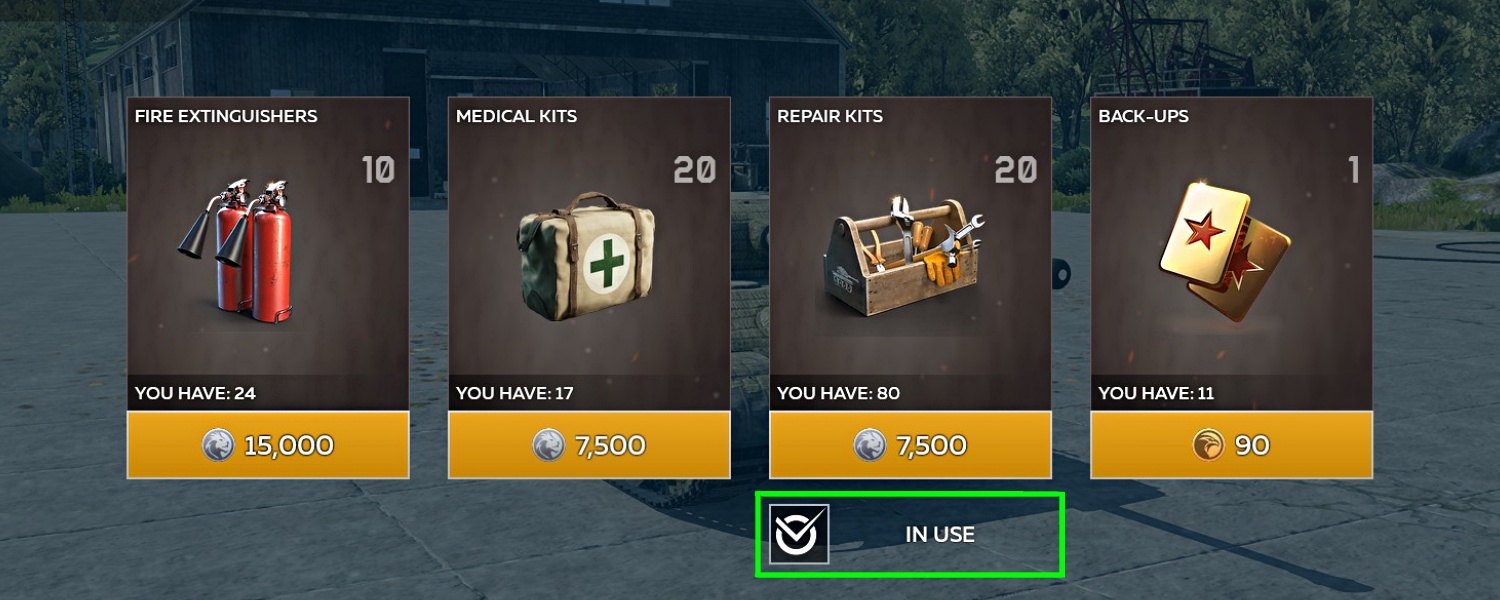
The choice is made before battle and applies for the whole battle. Canceling a paid repair doesn't refund the repair kit. If your consumables run out mid-battle, the paid repair icon automatically switches to free repair.
Repair assistance: drive close enough to a damaged ally, and a help icon appears. Activate it, and their tank repairs twice as fast. No repair kits are deducted from you for this.
Repair Speed
The repair speed formula no longer depends on crew health. Injured crew no longer slow down repairs. Only whether a crew member is alive matters.
Example:
Example:
We tested how repair time changes using the M109A1. We broke its gun. The crew was fully intact. The "Repair Speed" skill was not upgraded.
In the old repair system:
- the gun repairs in 24 seconds.
In the new repair system:
- with repair kits in 17 seconds (faster);
- free repair in 27 seconds (slightly slower).
And if you upgrade "Repair Speed" to 100%:
- with repair kits in 12 seconds;
- free repair in 20 seconds.
Important: these figures are for an intact crew. In the current system, every crew injury slowed repairs, and those same 24 seconds could grow considerably. In the new system, injuries do not affect repair speed, and the time only changes when crew members are killed.
Exact figures depend on the vehicle (there are more than 700 machines in the game). If the crew was injured, repair will be faster; if not, the time won't change.
Crew Skill: "Spare Parts" → "Firefighting"
In the "Crew → Maintenance" section, the "Spare Parts" skill has been replaced with "Firefighting".
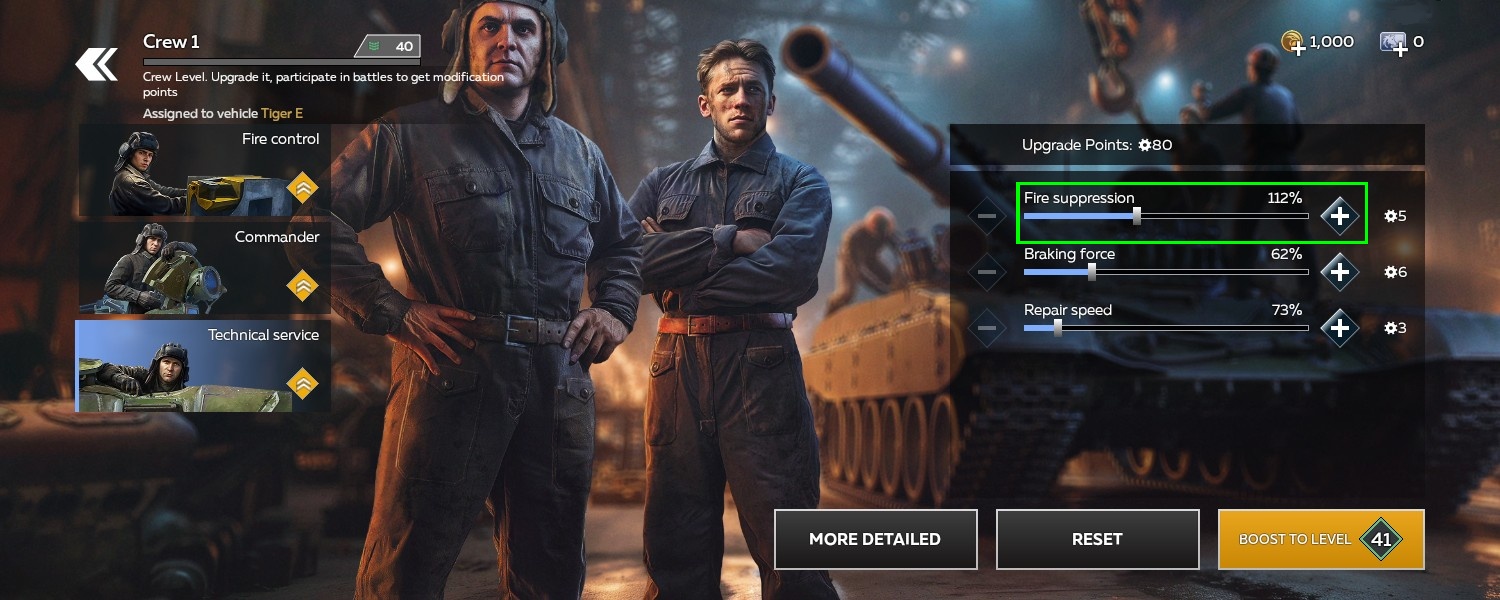
The reason is simple: repair is now available to everyone and unlimited, so the spare parts skill lost its purpose. "Firefighting" has 5 levels and at full upgrade speeds up fire extinguishing by 30%.
Please note that each tank in the game will now have 2 fire extinguishers available per battle.
Important: points invested in "Spare Parts" are preserved. After the update they are automatically reset to free – go to the "Crew" section and redistribute them: into "Firefighting" or any other parameter. You can invest them partially. If you don't redistribute them, the points stay free and grant no bonuses.
X-Ray: Colors and Thresholds
A module's color in the X-ray window depends on the condition of the vehicle:
- 100% – no tint (intact module).
- Below 100% – yellow (module has at least minimal damage).
- 70% – orange (repair becomes available from this point).
- 35% – red (critical damage).
- 0% – black with a red outline (module completely broken).
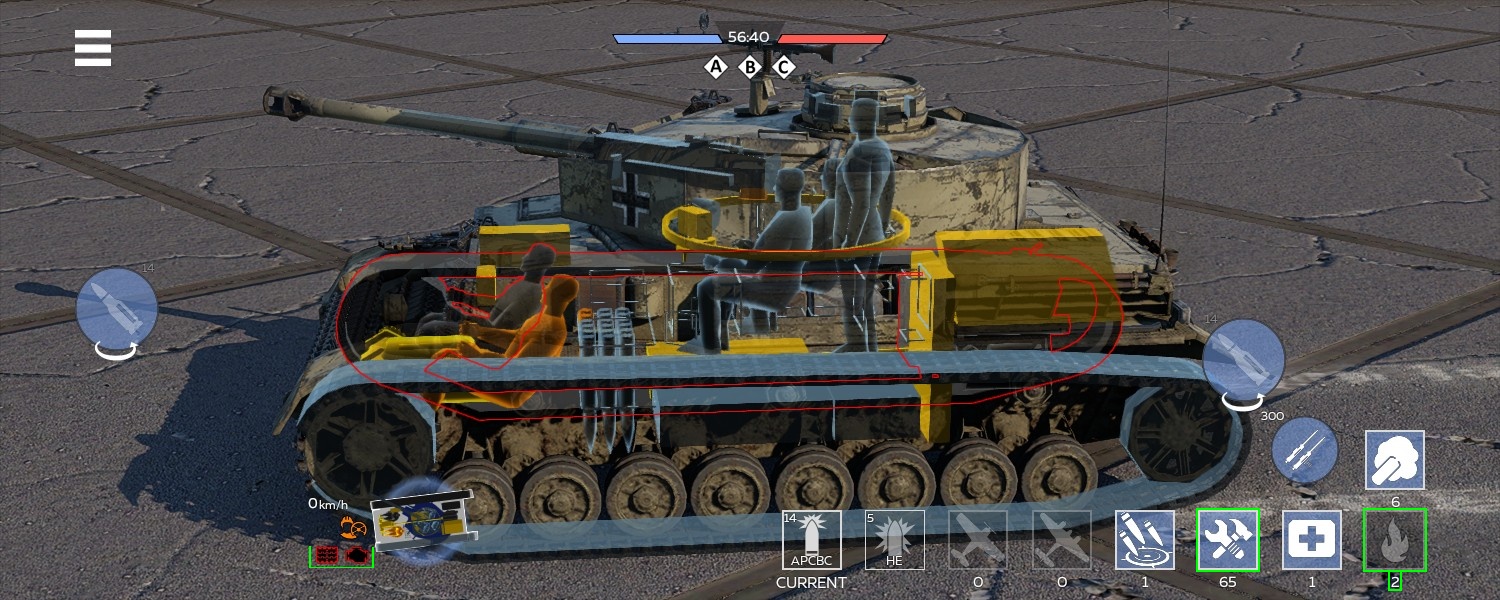
When you press the repair button, all yellow, orange, red, and black modules begin repairing.
Example: the gun is red, one track is yellow, the other is undamaged, the engine is orange: pressing repair will fix all damaged modules.
Indicators, Hit Camera, and Debuff Window
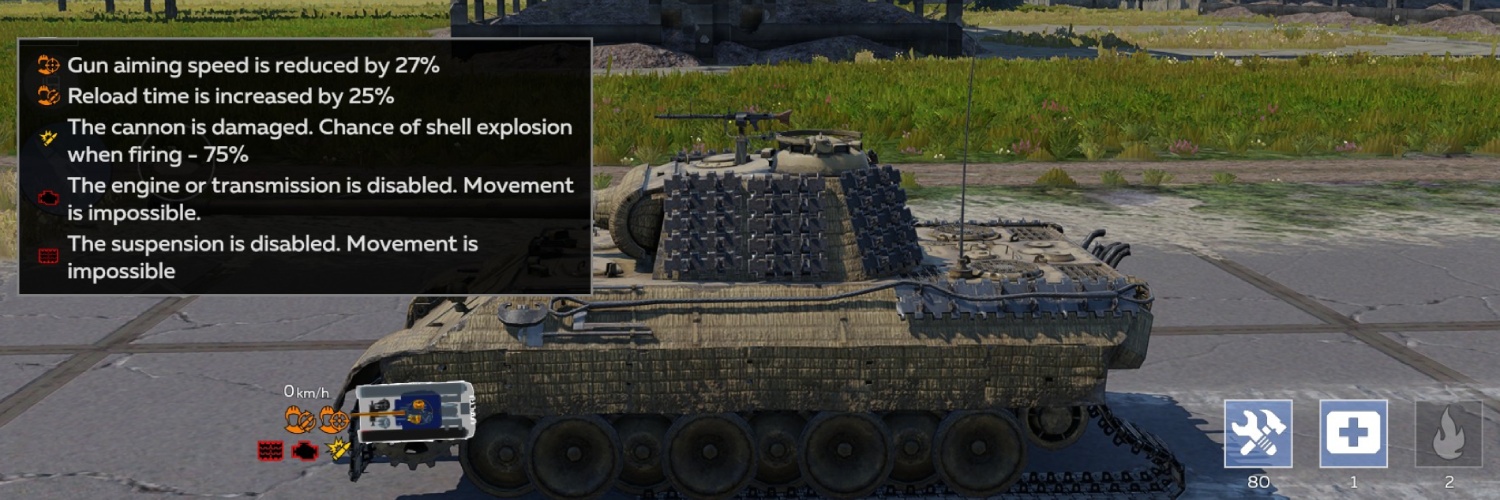
Indicators. Icons are now of two types:
- Effect icon – shows which penalty is applied to the tank when a module is damaged.
- Module icon – shows that a module is out of action (black with a red outline).
Hit camera. Only the icons the player actually sees have been kept. The icon set is now the same for all tanks – no second machine gunner or commander. The key roles remain: no driver - you can't move, no loader - you can't fire, no gunner - you can't aim the gun.

Debuff window. Press and hold the damage icon block and a window opens with all breakdowns, icon explanations, and penalty figures. That way you can assess the damage and decide when and where to repair. Pick a safe spot and fix up without risking yourself or your team.
What This Means for Players
Repair is now free, unlimited, and fully manual. You decide when to repair, how to repair, and whether it's worth spending repair kits for speed. Injured crew no longer waste your time, an interrupted repair doesn't go to waste, and the "tank spins in place, unable to move or repair" situation is a thing of the past.
If you're used to auto-repair, then yes, now you have to repair yourself. But in return you get control, full repair of all modules, and clear indicators. We worked on this mechanic for a long time based on your requests and hope it makes battles fairer and more convenient.
Q&A
1. Why remove automatic repair?
1. Why remove automatic repair?
The old system wasn't obvious: auto-repair only fixed tracks and the engine, and only when the tank was static. Many players didn't even realize this repair was available to them. Now repair is launched manually, but it fixes all modules at once, and you decide when and where to do it.
2. Do I have to repair manually all the time now? Isn't that inconvenient?
2. Do I have to repair manually all the time now? Isn't that inconvenient?
Yes, repair is launched manually. But you have a choice: free repair with no restrictions, or paid at 65% faster. You can also cancel a repair. And whatever was already fixed stays intact.
3. So is repair paid or not?
3. So is repair paid or not?
Repair is free. Repair kits are no longer needed to fix your vehicle – they only speed up repairs by 65%. Whether to use them is your choice before battle. It works like boosters: uncheck the box and repair for free or leave it checked and spend repair kits.
4. Why does the text mention paid repair? Is it for gold? Platinum? Subscription?
4. Why does the text mention paid repair? Is it for gold? Platinum? Subscription?
By “paid” repair we mean using repair kits to speed up vehicle repairs. Repair kits can be purchased for Silver Lions in the in-game store, or earned as login rewards, from watching ads, participating in events, opening Trophies, or as a bonus when purchasing vehicles, among other sources. The price of repair kits has not changed. The only change is that they are no longer required for repair itself – only to accelerate it. Use them as you see fit.
5. Can I check "Use repair kits" before battle and then decide in battle whether to repair paid or free?
5. Can I check "Use repair kits" before battle and then decide in battle whether to repair paid or free?
No. If you chose repair kits before battle, all repairs in that battle will be paid. The only exception is if your repair kits run out mid-battle. Then the repair icon switches to "Free repair".
6. Will free repair be slower than the old standard repair?
6. Will free repair be slower than the old standard repair?
Not exactly. In some cases the speed stays about the same, in others repair is even faster – because the dependency on crew condition has been removed. Injured crew no longer slow down repairs; only whether a crew member is alive matters.
7. How many times can I repair now?
7. How many times can I repair now?
An unlimited number of times per battle – both paid and free. If your kits run out, free repair becomes available instead.
8. What happens if I interrupt a repair?
8. What happens if I interrupt a repair?
Whatever was already fixed stays intact. Damaged modules begin repairing from scratch on restart.
9. Can I cancel a repair immediately?
9. Can I cancel a repair immediately?
The cancel button is locked for 1.8 seconds – so an accidental double tap in the heat of battle doesn't cancel the repair. Note: repair kits are deducted the moment you press, so canceling doesn't refund what was spent.
10. What do I do if my repair kits run out in battle?
10. What do I do if my repair kits run out in battle?
The paid repair icon automatically switches to free. You keep repairing, just slower.
11. How does repair assistance for an ally work?
11. How does repair assistance for an ally work?
Drive close enough to a damaged ally and a help icon appears. Activate it, and their tank repairs twice as fast.
12. When does repair become available?
12. When does repair become available?
When the integrity of at least one module drops to 70% or below. Below that threshold, damage is considered minor.
13. Why exactly 70%? In other words, why does the tank have to be damaged by 30% for repairs to become available?
13. Why exactly 70%? In other words, why does the tank have to be damaged by 30% for repairs to become available?
Above 70% of integrity, damage penalties are weak – you don't pay attention to them in battle. 70% is the point where noticeable penalties appear and repair is worth doing.
14. What if several modules are damaged? One at 70% intact, and the rest in the yellow zone at 90–95%? Which ones will be repaired?
14. What if several modules are damaged? One at 70% intact, and the rest in the yellow zone at 90–95%? Which ones will be repaired?
All modules with at least 1% damage are repaired. A fully intact module requires no repair.
15. If the module is 75% intact, can I not repair it?
15. If the module is 75% intact, can I not repair it?
Repair becomes available when at least one module drops to 70%. If all modules are above 70%, the repair button is inactive.
16. Why disable the repair boost on capture points?
16. Why disable the repair boost on capture points?
To preserve balance and avoid situations where a tank on a capture point repairs faster than the enemy can reload. Repair speed with repair kits will already increase noticeably on its own. Consider a Maus, T95, or BMPT with paid repair, a fully upgraded Repair Speed skill, a nearby ally, and a capture point bonus on top of that – the combination would be difficult to counter.
17. What does repair speed depend on now?
17. What does repair speed depend on now?
The overall repair speed of all noticeably damaged modules depends on the repair speed of the most complex module, the ratio of alive to dead crew members, and the "Repair Speed" skill upgrade.
18. If no one is injured, will free repair be faster?
18. If no one is injured, will free repair be faster?
Better put: with free repair, it won't be slowed down – it will be the same as before the changes. With paid repair, it becomes faster.
19. What does "modules are repaired in parallel" mean?
19. What does "modules are repaired in parallel" mean?
All damaged modules repair simultaneously, not one after another. If a module needs less time, it will be ready sooner – even if the most complex module is still repairing.
20. Where did the "Spare Parts" crew skill go?
20. Where did the "Spare Parts" crew skill go?
It was replaced with "Firefighting", because repair is now available to everyone and unlimited, so the spare parts skill lost its purpose.
21. What happens to my points invested in "Spare Parts"?
21. What happens to my points invested in "Spare Parts"?
They are preserved. After the update they are automatically reset to free – go to the "Crew" section and redistribute them: into "Firefighting" or any other parameter. You can invest them partially. If you don't redistribute them, the points stay free and grant no bonuses.
22. What do the module colors in X-ray mode mean?
22. What do the module colors in X-ray mode mean?
100% tank intact – no tint; below 100% – yellow; 70% – orange (repair available); 35% – red (significant damage); 0% – black with a red outline (module destroyed).
23. Why does yellow appear already at 99.9% and not at 100%?
23. Why does yellow appear already at 99.9% and not at 100%?
100% is a fully intact module. Any damage, even minimal, means it's no longer 100%, so the module turns yellow.
24. What gets repaired when I press the repair button?
24. What gets repaired when I press the repair button?
Absolutely all modules on the tank that have at least 1% damage.
25. None of the modules are colored, but the autoloader is yellow – why isn't it repaired?
25. None of the modules are colored, but the autoloader is yellow – why isn't it repaired?
Yellow means light damage that doesn't cause a significant penalty in battle. Repair activation becomes available once orange and red modules appear. When repair is activated, all damaged modules get repaired, even yellow ones.
26. Why were the commander and second machine gunner removed from the hit camera?
26. Why were the commander and second machine gunner removed from the hit camera?
Only the key roles that affect the tank remain: no driver – can't move, no loader – can't fire, no gunner – can't aim the gun.
27. How do I see all my breakdowns and penalties?
27. How do I see all my breakdowns and penalties?
Press and hold the damage icon block – a window opens with all breakdowns, explanations, and penalty figures. That way you can assess the damage and decide when and where to repair – pick a safe spot and fix up without risking yourself or your team.
Bonus question: RB when? Will there be a nerf or buff to bombers, aircraft carriers, big maps, custom sights, night maps, chat, and clans?
Bonus question: RB when? Will there be a nerf or buff to bombers, aircraft carriers, big maps, custom sights, night maps, chat, and clans?
RB is not planned for the near future. Clans are in development, and clan chat will be available in the game. For everything else, keep an eye on the news.
Try the new repair in War Thunder Mobile (WTM) and share your impressions. See you in battle!